Structural Design Patterns
These kinds of patterns explain how we can assemble objects and classes into larger structures, while still keeping these structures flexible and efficient.
Adapter
It's a structural design pattern that allows objects with incompatible interfaces to collaborate.
Explanation
Sometimes we have data types that are incompatible with one another, for
example, we could have users purchase activity as XML files, we found a
third-party service that is able to give us a recommendation model for the
users but this service uses JSON format as the input data.
We use the adapter pattern to create an interface that translates the content
from XML to JSON objects that can then be used by the
recommendation engine.
Besides transforming from different data formats we can also use it to create objects with different interfaces to collaborate.
Structure
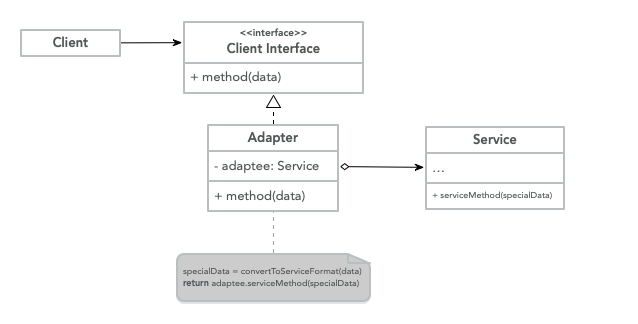
- Client: This is a class that contains the business logic of the program.
- Client Interface: Describes the protocol that the other classes need to follow to interact with the client code.
- Service: This is the class that requires the data to be transformed,
the
Clientcan use the service directly because of the compatibility. - Adapter: Is the class that can work with both the client and the service,
and implements the
Client Interfacewhile wrapping the service object. The adapter receives calls from the client via the adapter interface and translates those requests to the service in a format that it can understand.
Code
class Client {
    public static void main(String[] args) {
        String xmlFilePath = args[0];
        XML data = magicMethod(xmlFilePath);

        DataAdapter adapter = new DataAdapter();
        JSON json = adapter.transform(data);

        JsonService.serviceMethod(json)
    }
}

class DataAdapter implements DataTransformation {
    public JSON transform(XML xml) {
        JSON json = new JSON();
        // Magic happens
        json.data = xml.data;
        return json;
    }
}

interface DataTransformation {
    JSON transform(XML xml)
}

class XML {}

class JsonService {
    public static void serviceMethod(JSON json)
}

class JSON {}
When to use
- When you have an existing class but this class isn't compatible with the rest of the codebase.
- When you want to reuse existing subclasses that lack common functionality that can be abstracted into a superclass.
Façade
Is a structural design pattern that simplifies the interface to a library, a framework, or any complex set of classes.
Explanation
When we need to rely on frameworks or specific libraries, we need to initialize, configure and keep track of dependencies and execute the method in the correct order.
In the end, the logic of the application gets tightly coupled with the implementation of this third-party library, which makes it hard to maintain and comprehend, to avoid this we create a simple interface that provides the functionality that we really cared about instead of worrying about the underlying implementation.
This limits the functionalities provided by the library but enhances the functionality that our business really required and also decouples the program from that library.
Structure
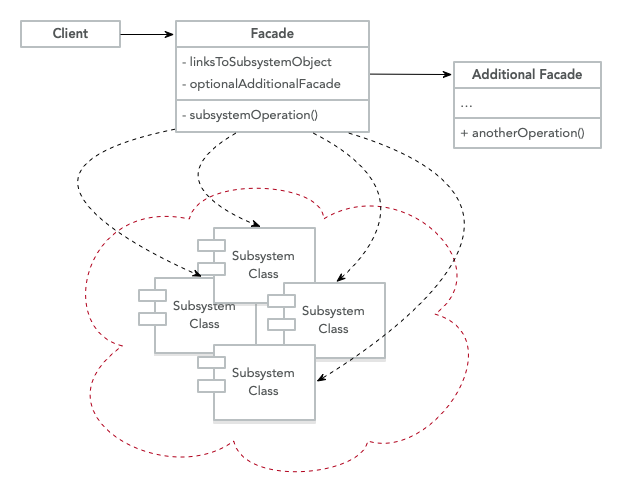
- Client: Uses the
Façadesinstead of calling the subsystems objects directly. - Façade: It provides convenient access to a particular part of the subsystem functionality.
- Additional Façade: These façades can also be created to prevent polluting a single façade with an unrelated feature that would make it another complex structure, this façade can be used by the client or another façade.
- Complex Subsystem: It could be various objects that interact in
complex ways, third-party libraries, frameworks, ORM. These subsystems are
unaware of the existence of the
Façades.
Code
class Client {
    public static void main(String[] args) {
        Coordinate from = getCurrentLocation();
        Coordinate to = getFavoriteLocation("home");

        MapService service = new MapService();

        Direction[] directions = service.getRoute(from, to);
        Event[] events = service.getEvents(directions);

        // Read out loud directions
        speak(directions)

        // Read out loud any events in the route
        speak(events)
    }
}

class Coordinate {
    private Float latitude;
    private Float longitude;
    public void Coordinates(Float latitude, Float longitude) {
        this.latitude = latitude;
        this.longitude = longitude
    }
}

class MapService  {
    private GoogleMap googleMapService;
    private Waze wazeService;
    public void MapService() {
        this.googleMapService = new GoogleMap();
        this.wazeService = new Waze();
    }
    public Direction[] getRoute(Coordinate from, Coordinate to) {
        this.googleMapService.getRoute(from, to);
    }
    public Event[] getEvents(Direction[] directions) {
        return this.wazeService.getEvents(directions);
    }
}

class GoogleMap {
    public Direction[] getRoute(Coordinate from, Coordinate to) {}
}

class Waze {
    public Event[] getEvents(Direction[] directions) {}
}

class Direction {}
class Event {}
When to use
- When you need a simple interface to interact with a complex subsystem.
- When you want to structure the subsystem into layers.
- When you want to decouple a library or framework from the business logic.